What's going out, when. Across every campaign.
One screen, every active campaign. Real cross-campaign conflict detection. Real time. No more reconciling three tools to answer 'what ships this week?'
The problem
The default mode for marketing operators running multiple campaigns is mental load. Three campaigns in flight means three different calendars in three different tools — the AE engagement programme view, the social scheduler, and the operator's Notion doc. Conflicts get spotted by accident, not by design.
The same audience gets an email from one campaign and a LinkedIn post from another on the same day. The team learns about it after the engagement metrics tell them. The senior marketer asks why the team is sending three emails in a week to the same segment, and nobody on the call has a good answer because nobody had a view that would have shown the conflict before it happened.
The master calendar is the answer to 'what is actually shipping this week, across everything we're running.' One source of truth, automatically reconciled.
How it works
The view
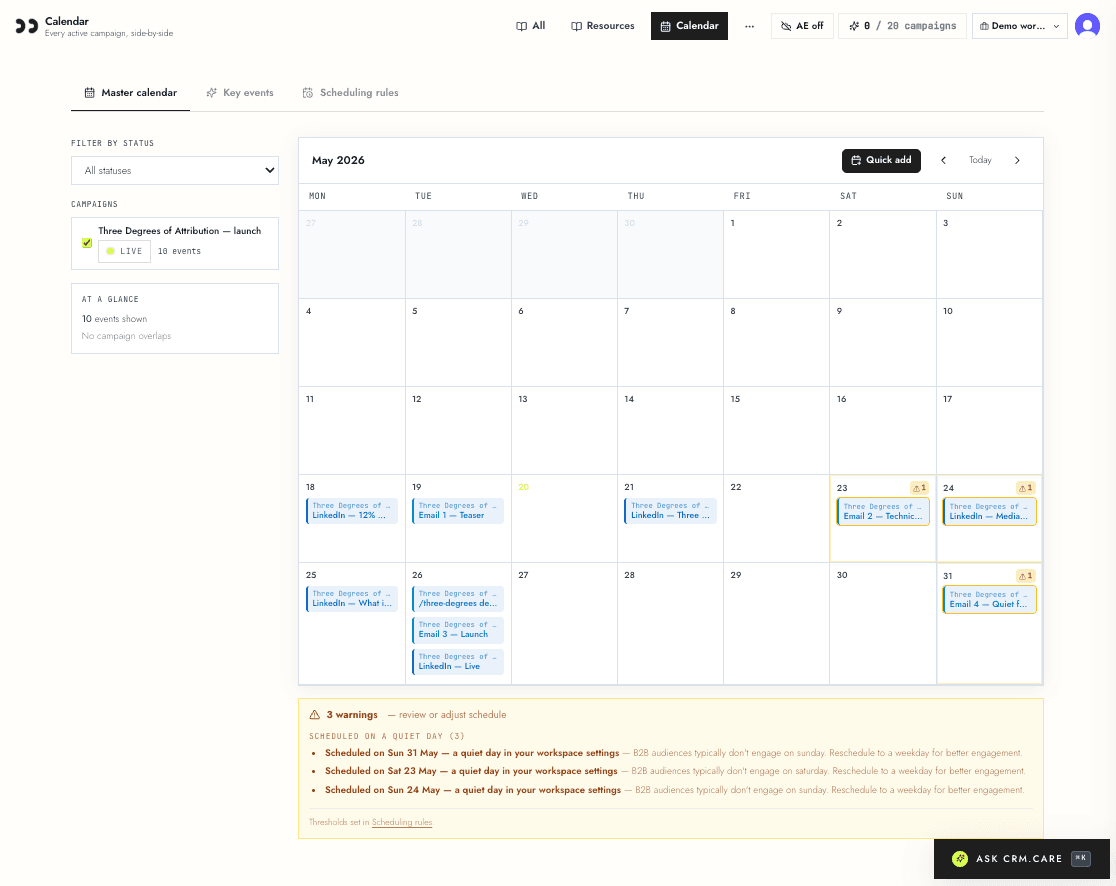
Every email, social post, gated asset, and landing page from every active campaign appears on a single month grid. Filter by campaign, channel, or status. Click any event tile to see what it links to — drill straight into that email or that social draft from the calendar.
Drag-add ad-hoc events directly from the calendar without attaching them to a campaign. The standalone-drafts library shows up alongside campaign events so the calendar is genuinely 'everything that's going out,' not just 'everything in a campaign.'
Conflict detection
Six conflict kinds run on every render. Two LinkedIn posts on the same day: warning. Two emails on the same day to the same audience: warning. More than one email per day or more than three per week: blocker by default. Same-platform posts within four hours of each other: warning. Total daily send count over five (across all channels): warning. Scheduled on a quiet day you've flagged: warning.
Each event tile is outlined with the colour of its highest-severity conflict. A panel at the top of the calendar groups conflicts by kind so the operator can fix the worst category first instead of clicking through every flagged event.
Thresholds are workspace-level configurable on /campaigns/scheduling-rules. Tighten if you're shipping at higher cadence. Loosen if you're doing an event-week burn and the defaults are too cautious.
Pre-publish gate
The same conflict rules gate publish-to-AE. A blocker conflict (e.g. frequency-cap-breach) hard-stops the publish with a clear reason. A warning shows a confirm-and-continue dialog listing what's wrong so the operator decides explicitly rather than blunders past it.
The gate is server-side. A determined client can't bypass it; the publish API enforces the rules from the workspace's scheduling rules table.
Why it matters
Marketing operators spend about 30% of their week on mechanical reconciliation — list builds, list pulls, 'did we already send this audience an email this week?', screenshot-comparing tab-strips of AE and Hootsuite and Notion. The master calendar collapses that question into one screen.
Conflict detection means the schedule self-checks instead of relying on the operator to remember every rule. The pre-publish gate means a senior marketer's '~30% of audience overlap' rule doesn't degrade as the team scales — it stays enforced, mechanically, by the platform.
Related features
See it in your own workspace.
Free 7-day trial. No card. The brief flow takes about five minutes to ship your first campaign — and master calendar kicks in from day one.